
All functionality to handle orders placed in the Outbox or Order responses is gathered here.
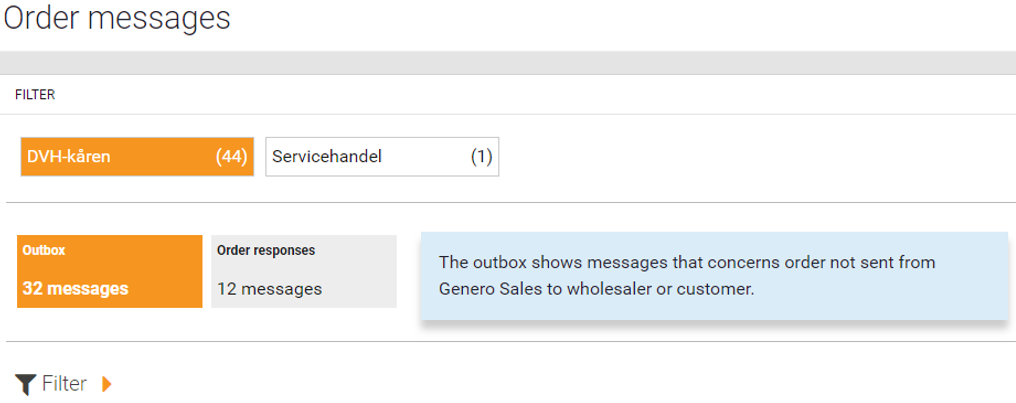
At the top of the page, you can choose to sort on a specific sales force.
Different examples of status: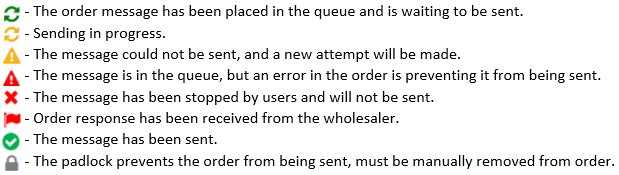
Outbox:
Here you will find messages regarding orders that have not been sent to the wholesaler or customer from Genero Sales. There may be several reasons why an order has not been sent to the wholesaler!
It may be because the wholesaler has no customer number for the customer or that the product has an incorrect product number on the block etc.
Orders that have been locked in this way, and where the error has not yet been corrected, will be noted with a  on the order line.
Click on a message to display the object menu and select one of the following options:
- Show order XXXXX - Opens order details.
- Show errors for XXXXX - Opens the dialogue box to correct errors.
- Revalidate message - Checks all information again.
- Remove on hold - The order will be dispatched once the padlock
 is removed.
 - Cancel message - Remove message from the outbox.
- Show customer in new tab - Opens the customer's details.
- Show wholesaler in new tab - Opens the wholesaler's details.
Order responses:
Here you will find orders sent to the wholesaler and returned with a message. 
In many cases, this regards error messages from the wholesaler, but it may also be information from the wholesaler.
Click on a message to display the object menu and select one of the following options:
- Show order XXXXX - Opens order details.
- Resend - Resend the message.
- Create back order for XXXXX - Creates a back order* which can be re-sent with corrected data.
- Show full response message - The full reponse message is displayed.
- Mark message as handled - If the order is OK
 , mark it as corrected. The order will then be removed from the order response.
 - Show customer in new tab - Opens the customer's details.
- Show wholesaler in new tab - Opens the wholesaler's details.
*Back order:
A back order is used when an order needs to be sent again to the wholesaler via EDI.
Most wholesaler do not allow an order to be sent with the same order ID as a previous order, so this feature must be used when an order is to be re-sent.
Using this feature, an order may be re-sent containing all the products -or only those that have yet not been processed- by the wholesaler.